
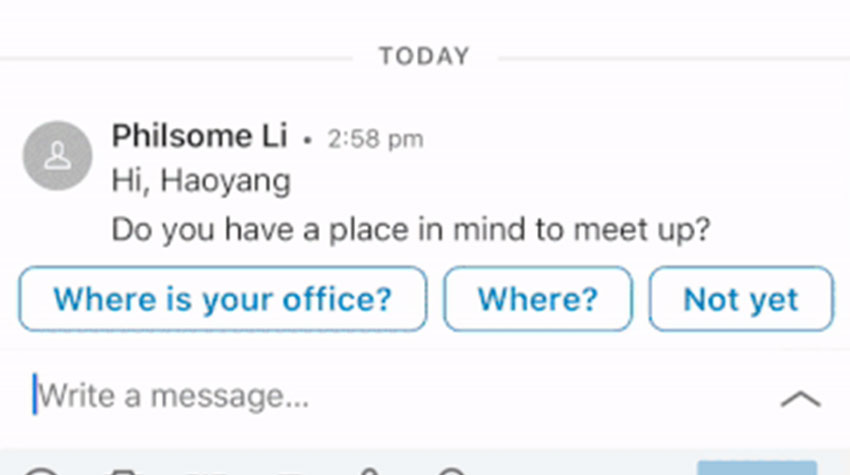
Do you need Smart Reply for LinkedIn?
Any business owner can tell you that they are busy, all the time. You could be in the middle of writing a huge report, but you get a message on LinkedIn from a potential client asking for a meeting. Do you take out the five minutes from your work and send a reply? If you don’t you could miss a lead.
Research indicates “that 80% of B2B leads come from LinkedIn.” As a business owner, you cannot afford to leave messages from LinkedIn without acknowledging their receipt. You could write an automated message, but that can often come off as impersonal and not genuine. This is the time to build rapport with your customers.
LinkedIn has recently introduced Smart Reply to their repertoire. I will talk to you about the ins and outs of Smart Reply so that you can decide whether or not you need Smart Reply for LinkedIn.
What is Smart Reply?
Smart Reply is an additional aspect of the LinkedIn messaging system. It uses machine learning to feed you contextual suggestions when using LinkedIn messaging. This means that when you are replying to a message it is a matter of pressing on a response, rather than having to type one out. This means that you are able to message faster, allowing you more time to concentrate on other work. The new technology also allows you to maintain your personal connection without the automatic robot nature you can often find with scheduled messaging. This is the key to maintaining relationships and making the most of your time.
Behind the Scenes of Smart Reply
You may be asking, how does it do this? Does this mean that LinkedIn is now monitoring your conversations? The answer is simple, no. LinkedIn uses a natural language processing (NLP) recommendation engine to provide you with the suggestions for messaging replies. Basically, they have taken a whole lot of messages from different people, removed the way that they are personalised. This means taking away names and putting in place setters. This then allows the use of the response and ability to personalise it for each user. A mixture of statistics and patterns in your own replies then allows the system to provide you with responses that make sense. Click on the link to learn more about the technology behind Smart Reply.
How to Set Up and Remove Smart Reply?
It is really simple to set up Smart Reply on LinkedIn. It is equally as simple to turn the function off.
Website – If you are using the LinkedIn website click on the photo of you on the top menu with the drop-down menu. Under the Account settings in the drop-down menu, click on settings and privacy. Along with the top menu, you will then click on the communications button. Then scroll down until you see the messaging smart replies. It is a matter of clicking on and off depending on which you would prefer.
App – If you are using the app click on the photo of you in the top right corner. Then click on the settings sprocket in the top right-hand corner. Select the Communications menu along the top of the page. Then scroll down to select the Messaging smart replies. If you would like the function on, click the toggle to on. If you would like smart replies turned off, click the toggle to the off position.
The smart reply function is currently only available in English. There are plans to roll the smart reply option out into other languages in the future. It is a function that we have already seen introduced into the Gmail suite.
With more people owning a phone than a toothbrush the importance of reaching customers digitally is clear. Using technology such as this can help a business to communicate more easily and at a faster rate. The knowledge that this kind of technology will only get better in time shows that we are capable of doing more. Now is the time for small businesses to keep up with digital advances.
Need more assistance with Smart Reply? You can chat with Prabin Gautam, one of the Top Lead Generation Experts in Melbourne today on 1300 777 847.